
HomeResources
Resources for apparel development
Clear details.
Better decisions.
Practical tools and guides to move your collection from the first inquiry to a production-ready brief.
Find your starting point01 / Prepare Your Inquiry
Start with the essentials.
A useful inquiry brings the product, quantities and references together. Start here even if your tech pack is still taking shape.
Download tool · Fillable PDF
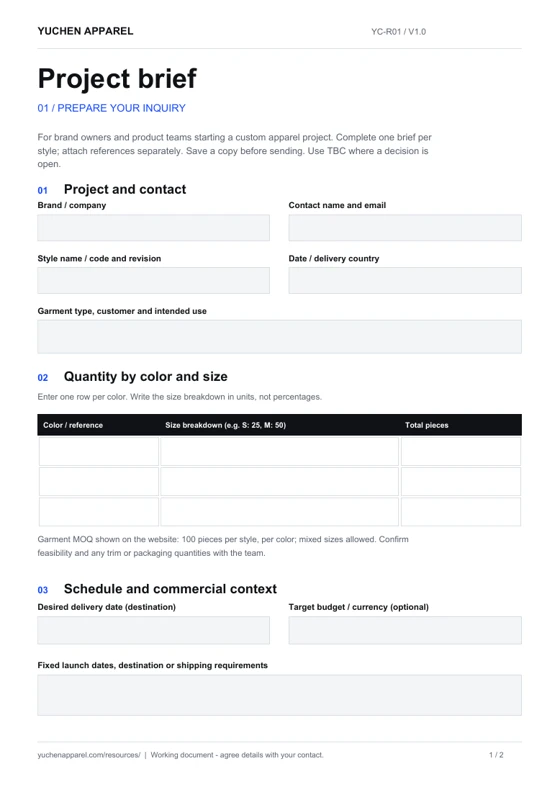
Project brief
For: Brand owners and product teams preparing a first inquiry.
Inside: Product direction, color and size quantities, fabric and fit, artwork, schedule and open questions.
Use it: Complete one brief per style and attach your references. Mark undecided details as TBC.
Download PDFREAD THE GUIDES
Choosing a clothing manufacturer
Prepare questions about product fit, communication and the evidence behind a supplier’s claims.
Understanding garment MOQ
Plan quantities by style, color and size before requesting a quotation.
Cut-and-sew or blanks?
Understand which development route fits the changes you want to make.
02 / Develop Your Sample
Make the brief measurable.
Turn references into a specification that can be discussed, sampled and revised. Keep one clearly named current version.
Download tools · Excel workbooks
T-shirt tech-pack workbooks
For: Designers and product developers documenting a T-shirt style.
Inside: Nine sheets covering the style brief, measurements, BOM, artwork, sample review, sizes and quantities, revisions, open decisions and instructions.
Use it: Fill the blank workbook for your own style. Keep the worked example alongside to see how the information connects.
These are the existing downloads from our T-shirt tech-pack guide. Example values are illustrative; agree your own specifications and tolerances.
READ THE GUIDES
What belongs in a tech pack?
Organize the garment specification, references and revision history.
T-shirt tech pack: from sketch to sample
Follow the measurements, materials and artwork behind the two Excel downloads.
Fabric GSM explained
Use fabric weight alongside composition, structure and finish when specifying hand feel.
03 / Review Your Sample
Give feedback that travels.
Review the physical sample against agreed references. Specific comments and photo IDs help keep the next revision focused.
Download tool · Fillable PDF
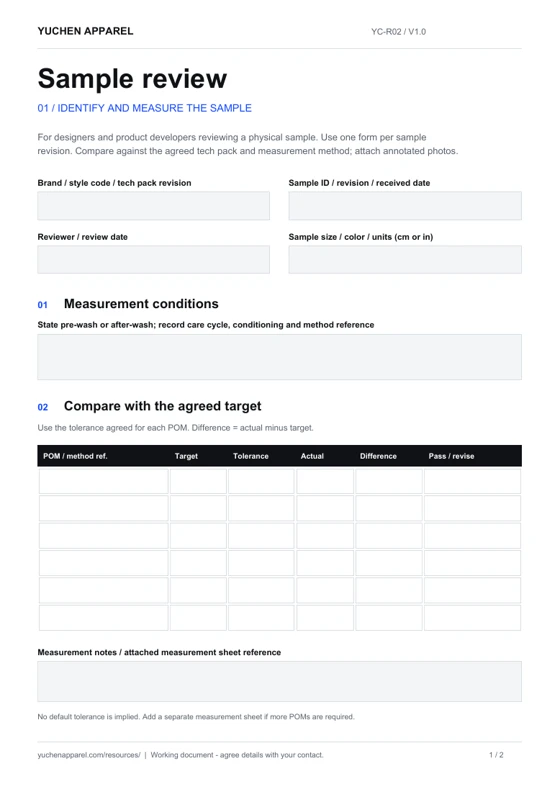
Sample review
For: Designers and product developers reviewing a physical sample.
Inside: Sample identity, six measurement rows, wash conditions, an issue log, review outcome and next actions.
Use it: Record the target and actual result, add annotated photos, then save one review per sample revision.
Download PDF04 / Prepare For Production
Keep the handoff complete.
An approved sample is part of the production baseline. Bring the final specification, order details and open actions into the same conversation.

Download tool · Fillable PDF
Pre-production checklist
For: Brand production leads preparing the handoff to bulk.
Inside: Nine checks for the product and order, evidence references, owners, open actions and approval records.
Use it: Confirm each item against a dated record. Agree unresolved details and the production release with your contact.
Download PDFWorking with the files
Download.
Complete. Discuss.
- Save your own copy. Open the PDFs in a reader that supports fillable forms, or use a spreadsheet application for the Excel files. Print the PDFs if you prefer to write by hand.
- Name the current revision. Add your style code, date and revision to each filename. Attach images or extra measurement sheets separately and reference them in the form.
- Bring the files into the conversation. Start with the inquiry page and share your saved files through the contact method agreed with the team.
These tools help organize decisions. Completing a form does not place an order or authorize production. Costs, timing, material availability and approval arrangements are confirmed for your project.
Discuss your project